

How requests work
A job is a unit of work containing the input data from the request, packaged for processing by your workers. If no worker is immediately available, the job is queued. Once a worker is available, the job is processed using your worker’s handler function.Sync vs. async
/runsyncsubmits a synchronous job.- Client waits for the job to complete before returning the result.
- Results are available for 1 minute (5 minutes max).
- Ideal for quick responses and interactive applications.
/runsubmits an asynchronous job.- The job processes in the background; retrieve results via
/status. - Results are available for 30 minutes after completion.
- Ideal for long-running tasks and batch processing.
- The job processes in the background; retrieve results via
Request input structure
When submitting a job with/runsync or /run, your request must include a JSON object with the key input containing the parameters required by your worker’s handler function:
Send requests from the console
The quickest way to test your endpoint is in the Runpod console. Navigate to Serverless, select your endpoint, and click the Requests tab.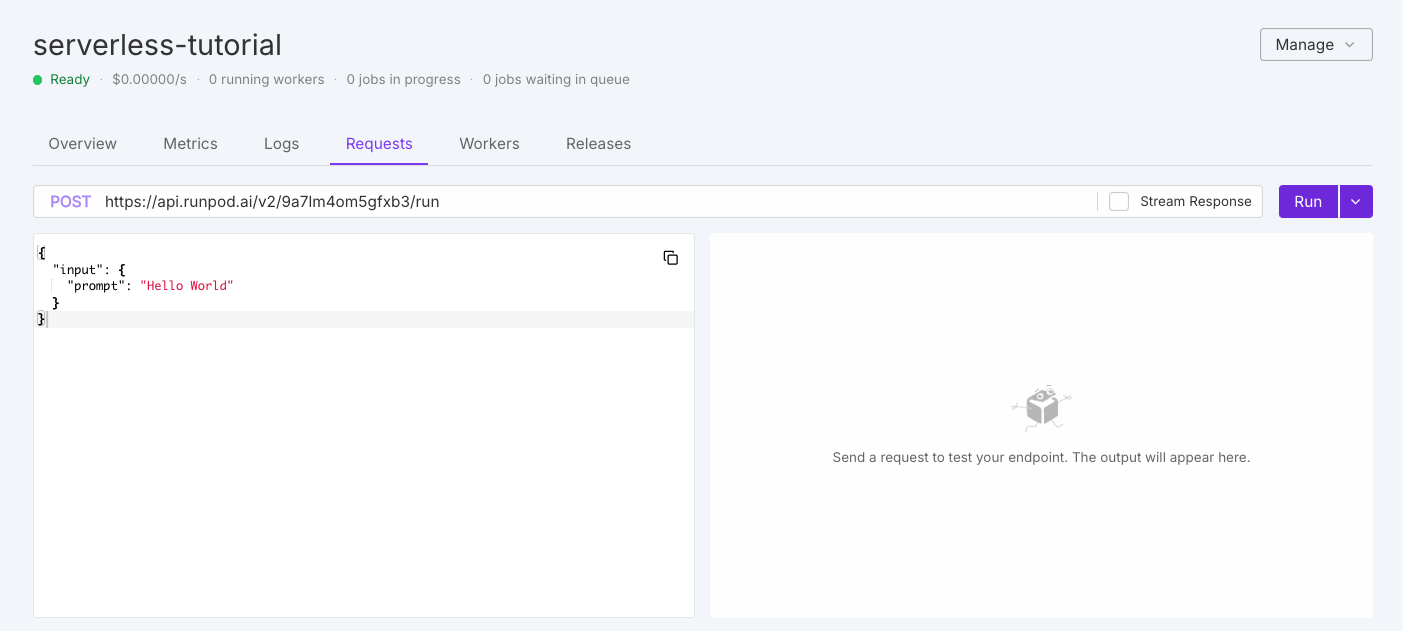
Operation overview
Queue-based endpoints support these operations for job lifecycle management:
See the operation reference for detailed examples using cURL and the Runpod SDK.
Advanced options
Beyond the requiredinput object, you can include optional top-level parameters for additional functionality.
Webhook notifications
Receive notifications when jobs complete by specifying a webhook URL:200 status code. If the call fails, Runpod retries up to 2 more times with a 10-second delay.
Execution policies
Control job execution behavior with custom policies:Setting
executionTimeout in a request overrides the default endpoint setting for that specific job only.TTL vs. execution timeout
ttl: Total lifespan of the job. Timer starts when submitted and covers queue time, execution time, and everything in between. When TTL expires, the job is deleted regardless of state.executionTimeout: Maximum time the job can actively run once a worker picks it up. Only enforced during execution.
Long-running jobs
For jobs that need to run longer than the default 24-hour TTL:- Set
executionTimeoutto your desired maximum runtime. - Set
ttlto cover both expected queue time and execution time.
Result retention
After completion, results are retained for a fixed period separate from TTL:S3-compatible storage
Configure S3-compatible storage for endpoints working with large files:Rate limits
Runpod enforces rate limits per endpoint and operation:Dynamic rate limiting
Rate limits scale with your endpoint’s worker count. The system uses whichever is higher between:- Base limit: Fixed rate limit per user per endpoint (shown above).
- Worker-based limit:
number_of_running_workers × requests_per_worker.
429 (Too Many Requests).
Handle rate limits in your client
Rate limits apply to each endpoint for each user. All of your processes that call the same endpoint with the same API key share one limit. Build your client to expect 429 responses and to keep its request rate below the limits in the table:- Retry 429 responses with exponential backoff and random jitter, and cap the number of retries.
- Limit how many requests your client has open at once. Each
/runsyncrequest stays open until the job finishes or the wait time expires. A burst of slow jobs can reach the concurrent limit well before the request rate limit. Use a bounded worker pool or semaphore rather than sending every request at once. - Poll
/statusat a measured interval that grows the longer a job runs, rather than in a tight loop. For jobs that take more than a few seconds, use webhook notifications instead of polling, or/streamfor incremental results. - Avoid calling
/requestsand/purge-queuefrom automated loops. Their limits are much lower than the job submission limits.
/run or /runsync after a network timeout or 5xx error can create a duplicate job because the first request may have been queued before the connection failed. A duplicate job runs and is billed separately. When /run returns a job ID, track the job with /status instead of resubmitting it, and use /retry to requeue a job that failed or timed out.
The following example submits a job with /run, retries 429 responses with backoff, and polls /status with a growing interval. It requires the requests package and the RUNPOD_API_KEY and ENDPOINT_ID environment variables.
Error handling
Common errors and solutions:
See error handling for implementation details.